Clarion is the newest release from the workshop, and it is built around a simple observation: most of us have no idea what we actually sound like. We rehearse presentations in our heads, we replay conversations after the fact, and the one voice we almost never listen to carefully is our own, in the moment, while we are using it. Clarion closes that loop. You put on headphones, read a passage from a scored teleprompter, and hear your own voice — live, delayed by up to two seconds, or masked under a soundtrack — while a real-time transcript scores every word you say. It is a practice room for anyone who wants to communicate more clearly and walk into their next conversation, meeting, or talk with more confidence.
Why Hearing Yourself Changes How You Speak
The core of Clarion is auditory feedback — the loop between your mouth and your ears. Change what a speaker hears, and you change how they speak, immediately and involuntarily. Clarion turns that quirk of human wiring into three distinct practice modes.
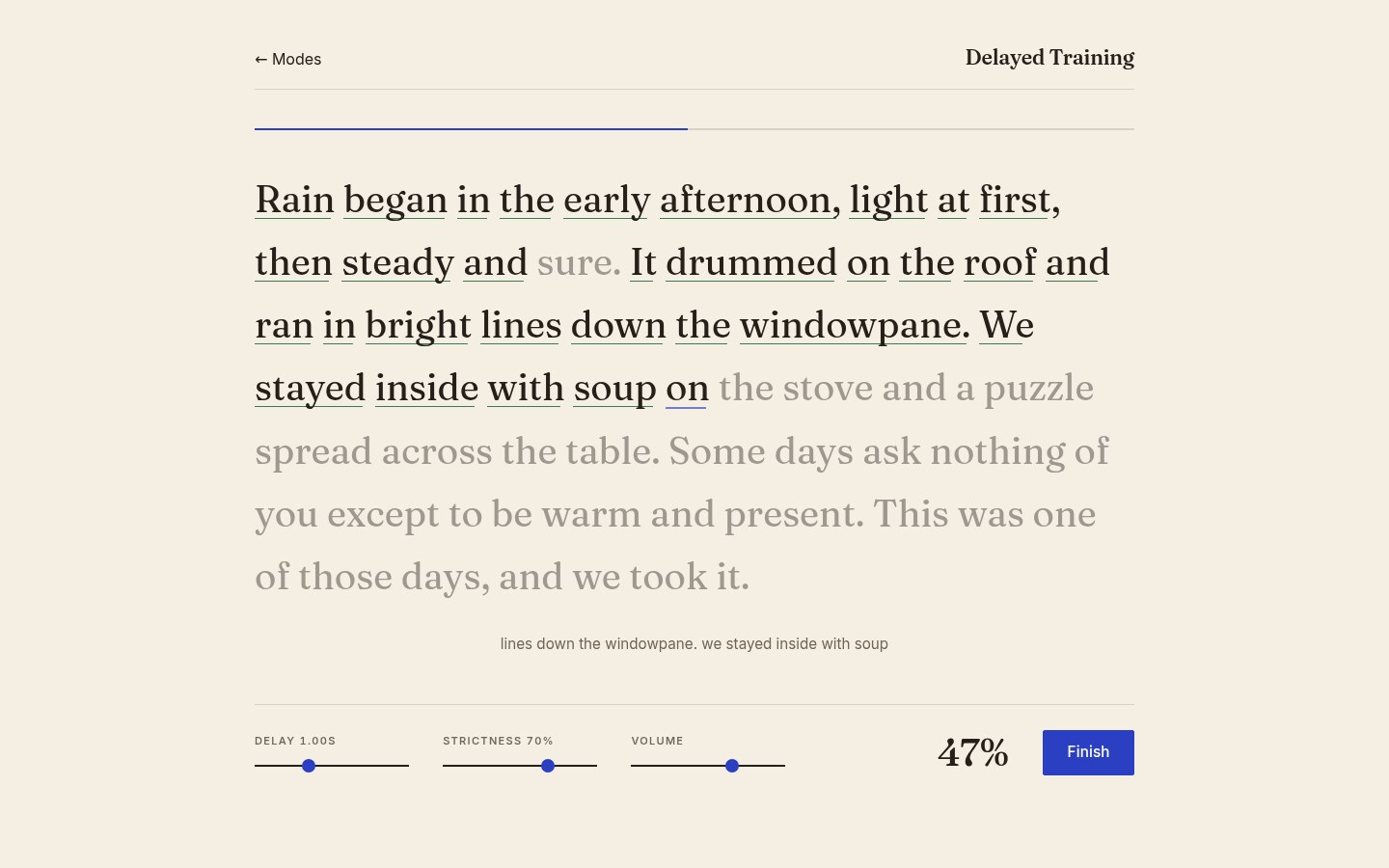
Live mode feeds your voice straight through to your headphones as you read. It works like a studio monitor for your speech: you hear your own articulation the way a listener does, not the way it sounds inside your head. Rushed word endings, swallowed syllables, and flat delivery become obvious in a way they simply are not when you read silently or mumble through a rehearsal. It is the fastest way I know to actually notice your own pronunciation habits.
Delayed mode plays your voice back to you a beat behind — anywhere from a fraction of a second to two seconds. Delayed auditory feedback is a decades-old technique, and many people who stammer find that speaking under a slight delay steadies their pacing and smooths their delivery. It is also a surprisingly effective public-speaking drill for everyone else: keeping your reading composed while yesterday's syllables are still arriving in your ears forces you to slow down, plant each word deliberately, and hold your rhythm under pressure. If you can deliver a passage cleanly under a one-second delay, a conference room is easy.
Masked mode covers your voice with a soundtrack so you cannot hear yourself at all. This leans on the Lombard effect — the reflex that makes people speak louder and more distinctly in a noisy room. Reading over the mask trains projection and clarity without you having to think about either.
The Scored Teleprompter
Modes are only half the product. The other half is that Clarion tells you, word by word, how you actually did. Every passage in Clarion comes with reference narration at three speeds, and that narration paces the teleprompter: words light up as the reference pace reaches them, so you always know where you should be. As you read, your speech is transcribed in real time and matched against the passage. Words you hit are marked as you say them, the transcript trails along under the prompter, and a score climbs in the corner of the screen. A strictness slider decides how forgiving the matching is; a delay slider tunes the playback; and when you finish, the session is scored against the reference baseline.
The score is not there to grade you like a quiz. It is there because practice without feedback is just repetition. Watching a percentage move session over session is what turns "I should speak more clearly" into something you can actually train — the same reason runners log their splits instead of just running.
The Technology Under the Hood
The speech recognition is ElevenLabs Scribe v2 Realtime, streamed over a websocket. The browser never talks to ElevenLabs directly — audio flows through a backend proxy that holds the API key server-side and relays transcripts back as you speak, the same keep-the-keys-off-the-client pattern I have used across the AI web application work this blog keeps coming back to. The reference narration is generated with ElevenLabs text-to-speech, then transcribed back through Scribe to recover per-word timings — which is how the teleprompter knows exactly when each word of the reference pace should light up, at all three speeds.
Latency matters everywhere in this app, for the same reasons it matters in real-time translation: feedback that arrives late is feedback about the wrong moment. The playback path in particular has to be tight — "live" monitoring with a noticeable lag would itself act like an accidental delay mode. Clarion also walks you through a quick gear calibration up front, with separate paths for earbuds, headsets, and standalone microphones, because the feedback loop only works if your microphone is not picking your headphone output back up.
Who It's For
Clarion is for anyone with a speaking moment they care about. The person with a best-man speech in three weeks. The developer who wants their standup updates and demo days to land instead of trailing off. The non-native English speaker who knows the vocabulary cold but wants their pronunciation to carry more easily in meetings. People who stammer and want a private, pressure-free place to practice with delayed feedback. Anyone preparing for interviews, lectures, podcasts, or wedding toasts — any situation where communicating clearly is the difference between being heard and being missed.
It deliberately feels more like a reading room than a piece of software: a quiet page, a passage worth reading aloud, and your own voice in your ears. No streaks guilting you, no leaderboard. Just you, a passage, and a score that inches upward as your delivery gets cleaner.
Try It
Clarion is live now at outdoordevs.com/clarion — sign in, put on headphones, pick a mode, and read. Start with live mode to hear what you actually sound like, then try a one-second delay and feel how differently you plant your words. It is a strange thirty seconds the first time. That strangeness is the point: it is the sound of actually listening to yourself.
And if the machinery is what interests you — the streaming transcription, the word-timing pipeline, the proxy architecture — the field notes on building AI-powered web applications and real-time translation cover the patterns Clarion is built from.